Sunday, June 14, 2020

GhostBSD, debugging boot startup

GhostBSD, debugging boot startup

Edit file /etc/rc.conf and add these two lines
rc_debug="YES"
rc_info="YES"

When given boot selection choice,  Select 4 or S for single user mode
then mount the ZFS file system for you to edit some boot files

WIP editing howto mount ZFS properly

Tuesday, May 12, 2020

GhostBSD, setup printing using HPLIP for an OfficeJet 4650 Multifunction Printer

Look at other Web resources for Linux & MacOS

https://wilsonmar.github.io/printing/   Great information resource

https://www.cyberciti.biz/faq/how-to-install-networked-hp-printer-and-scanner-on-ubuntu-linux/    How to install Networked HP Printer and scanner on Ubuntu Linux


HP does not provide telephone support for Linux printing. All support is provided online at the following web page: https://launchpad.net/hplip. On that page, click the "Ask a question" section.

  1. First use your OS software installation tool.  For GhostBSD 20.04 its "Software Station"  Search for  HPLIP    I found hplip version 3.19.12_3 27.1 Megabytes in size  Drivers and utilities for HP printers and All-in-One devices
  2.  Change to Root user.  "su"   issue your Password 
  3.  Use the HP Setup application hp-setup from a terminal command line window to start the process.
  4.  


Thursday, March 26, 2020

Descrição do PuppyLinux Fatdog64 em Português


Fatdog64: Uma distribuição potente para instalar no pen drive USB!

Com um arquivo de instalação de menos de 450MB, é possível instalar uma distribuição Linux leve e cheia de recursos úteis para estudantes e professores direto no pen drive USB, sem necessidade de instalação na máquina e alteração das instalações do Windows, Linux e macOS. O Fatdog64, originalmente um derivado do PuppyLinux, é uma das melhores distribuições nessa categoria de uso e pode ressuscitar aquele computador antigo que você pensava que não tinha mais utilidade. O Fatdog64 também é útil como um sistema de reserva para o caso de o teu computador não iniciar o sistema. Você pode inclusive testar o Fatdog64 na página Distro Test sem precisar baixar ou instalar nada (instruções mais adiante). Experimente hoje mesmo o Fatdog64!

Requisitos mínimos de sistema: CPU de 64 bits x8664/AMD64 e 1 GB de RAM. A maioria dos processadores Intel e AMD produzidos após 2008 suportam 64 bits (inclusive muitos Intel Atoms).

Página da Distro Test para experimentar o Fatdog64 versão 801 direto do teu navegador de internet, sem a necessidade de baixar ou instalar nada:  Fatdog64 versão 801 na Distro Test (em inglês)

Vídeo demonstrativo do Fatdog64 no YouTube:
https://youtube.com/watch?v=Nvg-JqttWiY

Instruções para a instalação do Fatdog64 no pen drive USB:
Obtenha o arquivo .ISO no endereço http://distro.ibiblio.org/fatdog/iso/Fatdog64-810.iso
(ou você pode acessar a lista de arquivos .ISO no endereço http://distro.ibiblio.org/fatdog/iso para obter uma versão mais atualizada). Depois use um programa para gravar essa imagem no pen drive; os programas recomendados são o Rufus (para Windows) e o BalenaEtcher (para Windows, macOS e Linux). No Linux também é possível usar o comando ‘dd’: “dd bs=4M if=Fatdog64-810.iso of=sdX” (sdX pode ser sdb, sdc ou sdd, conforme a configuração do teu sistema). Com estas instruções, você terá criado um pen drive USB que vai funcionar como se fosse um sistema instalado na tua máquina, porém sem necessidade de instalação. Teus arquivos e configurações caminharão sempre contigo no pen drive! Atenção: Como um pen drive é pequeno e fácil de perder, não se esqueça de fazer backup regularmente para não correr o risco de ficar sem teus arquivos importantes.

Com apenas 10 minutos, 2 transferências de arquivos, e 1 unidade USB disco você pode testar uma distribuição Linux à tua escolha sem precisar instalar no computador!  Experimente o Fatdog64 versão 810!

Caso o teu computador não consiga executar um sistema de 64 bits, experimente o BionicPup 8.0, que possui versão para 32 e 64 bits: Puppylinux.com  BionicPup 8.0.

Informações técnicas do Fatdog64 810:
O Fatdog64810 versão final foi lançado em 20 de janeiro de 2020.
O Fatdog64810 GNU/Linux é o quarto lançamento da série 800 do Fatdog64, a qual é baseada no Linux From Scratch 8.2/Cross Linux From Scratch 2017.07.
Esta é uma atualização de manutenção. As principais razões para a atualização são as falhas de segurança Intel ZombieLoad/DMS as quais requerem uma atualização do núcleo do sistema e do microcódigo da CPU, incluídas nesta atualização.

Outros endereços úteis para usuários do Fatdog64 (páginas em inglês):
Página dos lançamentos do Fatdog64
Fórum (em inglês) do Fatdog64 para as versões 810/802/801/800
Direto da mesa do James, as notas sobre o Fatdog64 801 (em inglês)
Notas de lançamento da última versão do Fatdog64
F
órum Murga-Linux com anúncios de novas versões do Fatdog64 (em inglês)
Instruções (em inglês) para instalar no disco rígido interno
Instruções (em inglês) para instalar em computadores UEFI e dual boot com o Windows 8
P
ágina do Puppy Linux (em inglês)
Fórum de Discussão do Puppy Linux (em inglês)
P
esquisa do Fórum de Discussão do Puppy Linux (em inglês)
Versão em inglês do meu blogpost sobre o Fatdog64 810

Tuesday, March 24, 2020

Upgrade your slow HOME computer with Zorin15

Upgrade your slow HOME computer with Zorin15 Linux or Puppy Linux operating system.


Yes, you might need to use all windows software to interact with your companies windows desktops.  In that case, you can dual boot your computer with both Windows and Linux.


Thereby needing to continue with Windows 10 Operating System software, but you might find that you can perform your work at home with a Linux Operating System and Linux application programs.
So If the local shop is fresh out of hardware to buy,  How does a free software download sound?  Good?

10 minutes, 2 downloads, 1 USB flash drive to give Linux a spin on this laptop in front of you.

If you feel your laptop could use a speed boost, but your wallet is sparsely populated with cash.  Test drive a live linux on your present Windows laptop hardware or desktop.

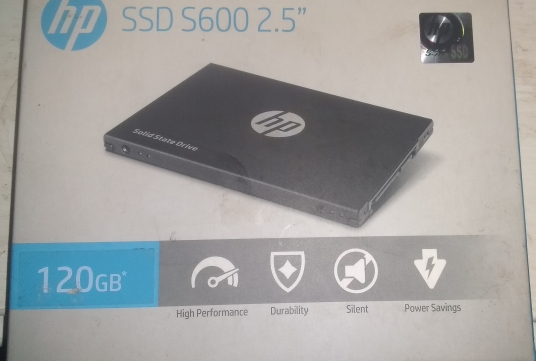
2nd option, consider purchasing a cheap 120GB  SSD SATA 2.5" drive to either install internally to replace the hard drive in your laptop  or connect externally via USB 2.0 or USB 3.0 cable to a USB 3.0 to SATA drive enclosure with the SSD placed inside.


120GB 2.5"  SATA SSDs


3rd option here is a 32GB, 64GB, or 128GB single USB 3.0 Flash Drive.

usb flash drive


https://opensource.com/article/20/3/open-source-working-home  Here are some tools you can use Free, from your work at home site. 

Google some of these next items, to find their website.
ZorinOS 15 Lite is a free download that you can try booting live from a USB flash drive. 
Fatdog64 Puppylinux can also be installed into a USB flash drive and booted from USB flash drive without changing a thing on your Windows Computer.  Just hit the F12, F10 or ESC   BIOS boot drive select key to select which disk drive to boot up from.  Choose the external USB Flash Disk.

So don't have a USB Flash Drive handy?
  Lick Installer .EXE file works on your present windows PC to install a puppylinux version 8.0  or Fatdog64 in a single file on your existing Windows C:\ disk.
http://puppylinux-or-pcbsd.blogspot.com/2019/11/ms-windows-users-consider-lick.html
http://puppylinux-or-pcbsd.blogspot.com/

Need more information and help. Check out the forums of your chosen Linux Distro.  Join a local Linux Users Group (LUG) in your neighborhood.  Join Telegram group,   t.me/linux4everyone and visit and ask questions.
google Linux4everyone linux4everyone.com ,   Listen to one of Jason Evangelho's podcasts.  Read his Linux Gaming articles at Forbes.com  https://www.forbes.com/sites/jasonevangelho/#7565da20d36f

Enjoy the software and hardware that you have now.  If you feel Windows is too slow when working remotely from home,  maybe changing over to ZorinOS Linux and a SSD SATA 2.5" inch drive will improve your work flow.  Maybe using PuppyLinux 8.0 or Fatdog64 810 (includes LibreOffice 6.1.2) from a USB flash drive will help you out.
10 minutes, 2 downloads, 1 usb flash drive is all that it requires.   You have the time and means now that you are home.

Give it a shot and explore the speed that is in your present laptop hardware.

Fred
Colton Oregon USA

$45 for ZorinOS 15.2 installed to a 16GB USB Flash drive.
https://paypal.me/KlikTel. Fred Finster Email me Here

Monday, December 30, 2019

Espaniol langua, Fedora Workstation próximamente

Creo que es un soporte muy pobre para los hispanohablantes. En todas mis distribuciones, creo que Fedora Workstation es la más distribuida con soporte para hispanohablantes.  ¡Mi experiencia con Fedora ha sido increíble! y gracias por tu interés

I think it is very poor support for spanish speakers. In all of my Distros I think Fedora Workstation is the most Distro with support for Spanish speaker.  My experience with Fedora has been amazing! and thank you for your interest


https://getfedora.org/en/workstation/download/


BrayaON, [30.12.19 23:35]
I think it is very poor support for spanish speakers. In all of my Distros I think Fedora Workstation is the most Distro with support for Spanish speakers

BrayaON, [30.12.19 23:36]
for that reason I felt in love with Fedora

BrayaON, [30.12.19 23:36]
You feel like you're in home :)


Fatdog64  PuppyLinux information
https://puppylinux-or-pcbsd.blogspot.com/2019/04/fatdog64-800-release.html


Sunday, December 1, 2019

Telegram Group Linux4Scratch (linux from scratch build) or L4S

Version-check.sh  file slightly modified from Linux from Scratch linuxfromscratch.org

#!/bin/bash
# Simple script to list version numbers of critical development tools
# To see whether your host system has all the appropriate versions,
#  and the ability to compile programs, run the following:
export LC_ALL=C
bash --version | head -n1 | cut -d" " -f2-4
MYSH=$(readlink -f /bin/sh)
echo "/bin/sh -> $MYSH"
echo $MYSH | grep -q bash || echo "ERROR: /bin/sh does not point to bash"
unset MYSH
echo -n "Binutils: "; ld --version | head -n1 | cut -d" " -f3-
bison --version | head -n1
if [ -h /usr/bin/yacc ]; then
echo "/usr/bin/yacc -> `readlink -f /usr/bin/yacc`";
elif [ -x /usr/bin/yacc ]; then
echo yacc is `/usr/bin/yacc --version | head -n1`
else
echo "yacc not found"
fi
bzip2 --version 2>&1 < /dev/null | head -n1 | cut -d" " -f1,6-
echo -n "Coreutils: "; chown --version | head -n1 | cut -d")" -f2
diff --version | head -n1
find --version | head -n1
gawk --version | head -n1
if [ -h /usr/bin/awk ]; then
echo "/usr/bin/awk -> `readlink -f /usr/bin/awk`";
elif [ -x /usr/bin/awk ]; then
echo awk is `/usr/bin/awk --version | head -n1`
else
echo "awk not found"
fi
gcc --version | head -n1
g++ --version | head -n1
ldd --version | head -n1 | cut -d" " -f2- # glibc version
grep --version | head -n1
gzip --version | head -n1
cat /proc/version
m4 --version | head -n1
make --version | head -n1
patch --version | head -n1
echo Perl `perl -V:version`
python3 --version
sed --version | head -n1
tar --version | head -n1
makeinfo --version | head -n1 # texinfo version
xz --version | head -n1
echo 'int main(){}' > dummy.c && g++ -o dummy dummy.c
if [ -x dummy ]
then echo "g++ compilation OK";
else echo "g++ compilation failed"; fi
rm -f dummy.c dummy
echo  "Linux kernel version running on your computer system"
uname -a

Use in a terminal window with this line, replacing [mydistro_name_me] manjaro18_Fred like this  "version-check.results_manjaro18_Fred"
bash version-check.sh > version-check.results.[mydistro_name]

version-check.results_Manjaro18_Fred from  Telegram Group Linux4Scratch files

bash, version 5.0.11(1)-release
/bin/sh -> /usr/bin/bash
Binutils: (GNU Binutils 2.32) 1.16
bison (GNU Bison) 3.4
yacc is bison (GNU Bison) 3.4
bzip2,  Version 1.0.8, 13-Jul-2019.
Coreutils:  8.31
diff (GNU diffutils) 3.7
find (GNU findutils) 4.7.0
GNU Awk 5.0.1, API: 2.0 (GNU MPFR 4.0.2, GNU MP 6.1.2)
/usr/bin/awk -> /usr/bin/gawk
gcc (GCC) 9.2.0
g++ (GCC) 9.2.0
(GNU libc) 2.30
grep (GNU grep) 3.3
gzip 1.10
Linux version 4.19.79-1-MANJARO (builduser@lancaster) (gcc version 9.2.0 (GCC)) #1 SMP PREEMPT Fri Oct 11 19:57:09 UTC 2019
m4 (GNU M4) 1.4.18
GNU Make 4.2.1
GNU patch 2.7.6
Perl version='5.30.0';
Python 3.7.4
sed (GNU sed) 4.7
tar (GNU tar) 1.32
texi2any (GNU texinfo) 6.6
xz (XZ Utils) 5.2.4
g++ compilation OK
Linux kernel version running on your computer system
Linux kliktel-pc 4.19.79-1-MANJARO #1 SMP PREEMPT Fri Oct 11 19:57:09 UTC 2019 x86_64 GNU/Linux

What does you results file look like?  When I ran on Peppermint 10, software tool 'Bison' was missing.   I am getting ready to run this from BionicPup8 in a Gnome-Boxes virtual machine

version-check.results_BionicPup8__Fred

https://pastebin.com/F1tgqXMr 
 Good for one year from December , 2019  Fred says


Add the Devx_  file to standard puppylinux.  Use the Menu-->System-->Quick_SFS_load application to install the development tools.
Seem that we are still missing 'yacc' tool (yet another compiler compiler).

version-check.results_BionicPup8__Devx_Fred

https://pastebin.com/H8xiAyzy

Wednesday, November 27, 2019

Why you should replace Windows 7 with Linux

https://vivaldi.com/blog/replace-windows-7-with-linux/

Your Windows 7 is likely running on an older machine that might struggle with a resource hungry operating system like Windows 10. 
To run Windows 10, you need a 1 GHz processor, 1 GB for 32-bit or 2 GB for 64-bit RAM, 16 GB for 32-bit OS or 20 GB for 64-bit OS, and a 800 x 600 resolution display. And that’s just a bare minimum. 
For many machines, the answer will not be Windows 10. 
What you need instead is a lightweight, efficient OS that is – of course – resistant to viruses.

Why replace Windows 7 with Linux ??


Replacing your Windows 7 with Linux is one of your smartest options yet. 


But rest assured that things have moved on in the Linux world. It has become much more accessible to the average user. If like most average users, you use your computer to browse the internet, watch movies and work on some documents, then you will be just fine. Install Linux and enjoy! 

 ZorinOS 15 Lite  is good.  https://zorinos.org

PeppermintOS  is good   https://peppermintos.com

Pop!_OS  is good  https://www.system76.com/pop

Fatdog64  https://www.lightofdawn.org/blog/?viewCat=Fatdog64